
Bluebeam-grade takeoff without the Bluebeam tax.
Native on Mac and Windows. AI included on every seat, not gated behind a tier. And a perpetual license that still exists — the kind the rest of this category never offered. Measure off the plan set, price it with your own assemblies, export the bid. Same window, no re-typing.
7 days, every feature, no credit card — the trial starts the moment you sign up and nothing is charged when it ends.
- Measuring tools, one keystroke away
- 6 Committing 5 quantity types
- Dockable panels, arranged your way
- 19 Dock, float or hide every one
- Saved per seat per year
- $2,998 vs Togal.AI list pricing
- Documentation articles, written
- 23 Not a "contact support" page
Open the whole set, not one sheet at a time.
Drag in a 200-page bid set and pick the sheets you need. Sheet numbers and titles are read off the title block. Scanned drawings go through OCR on the way in, so a photocopied addendum is searchable text like everything else.
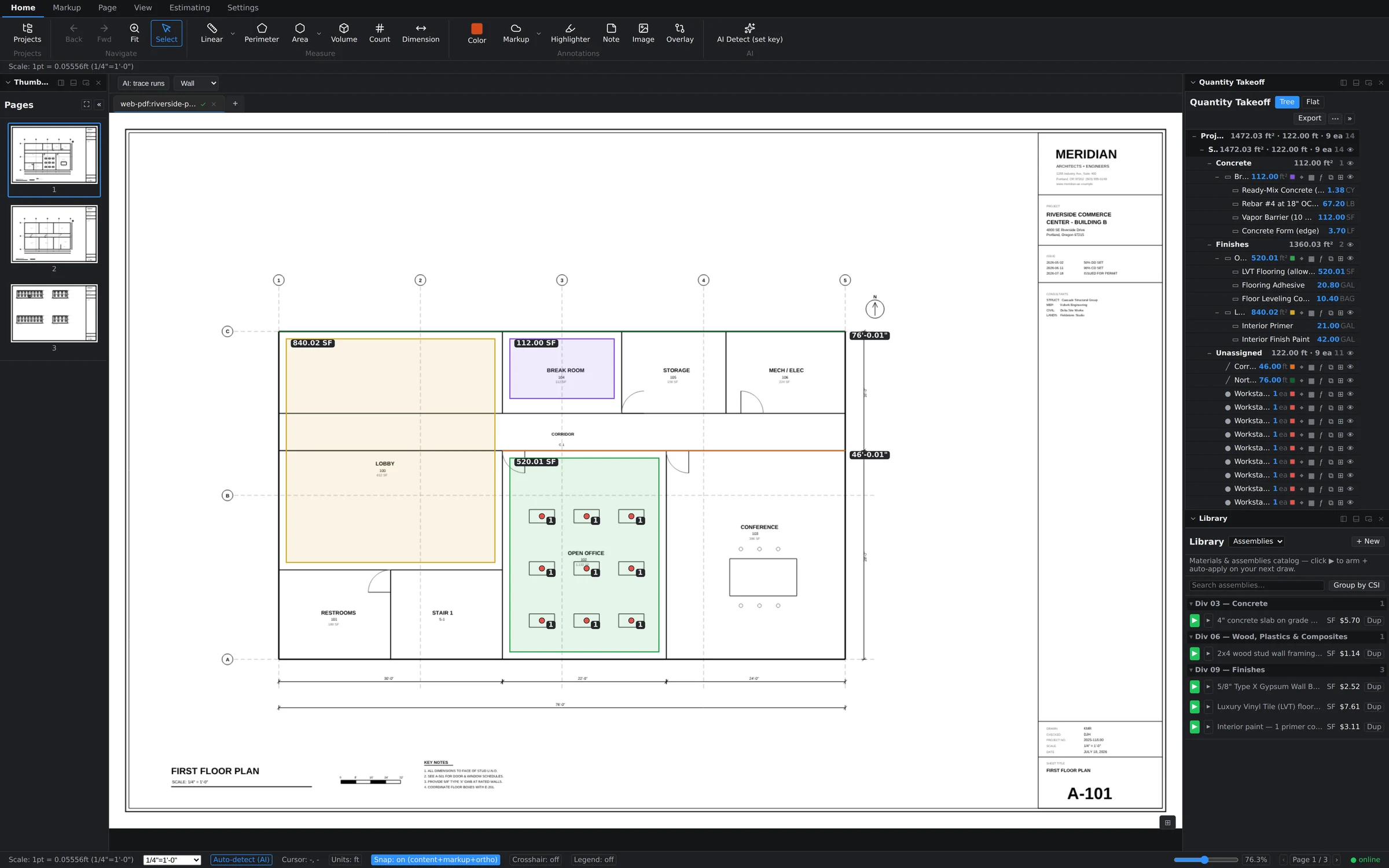
Set the scale once. Every number after it stays honest.
Groundwork reads the scale off the sheet where it can and tells you when it can't, instead of guessing. When it can't, you calibrate off a known dimension in two clicks. Get this wrong and every quantity downstream is wrong — so it is the one step the app refuses to be vague about.
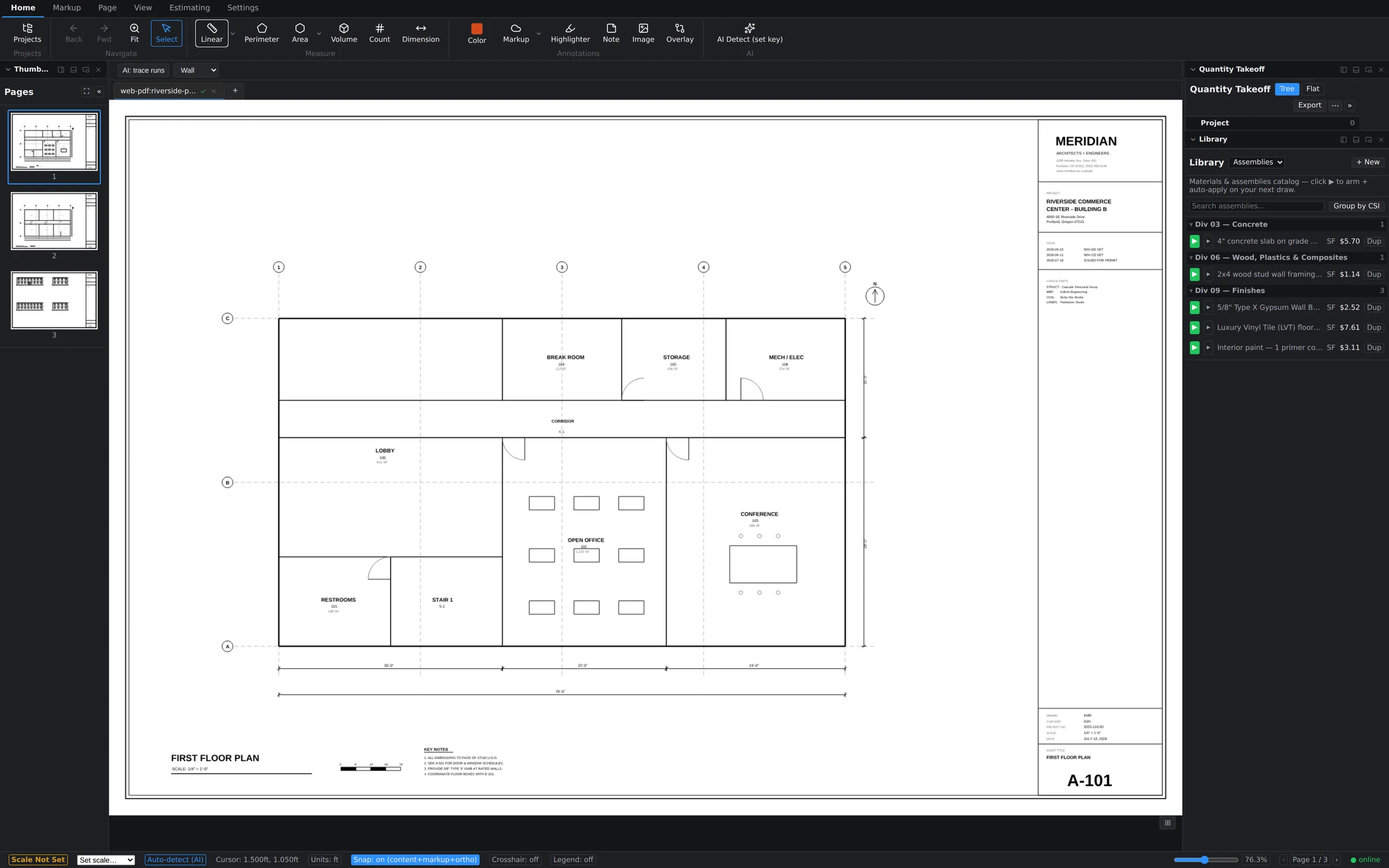
Six tools. Five quantity types. No mode-hunting.
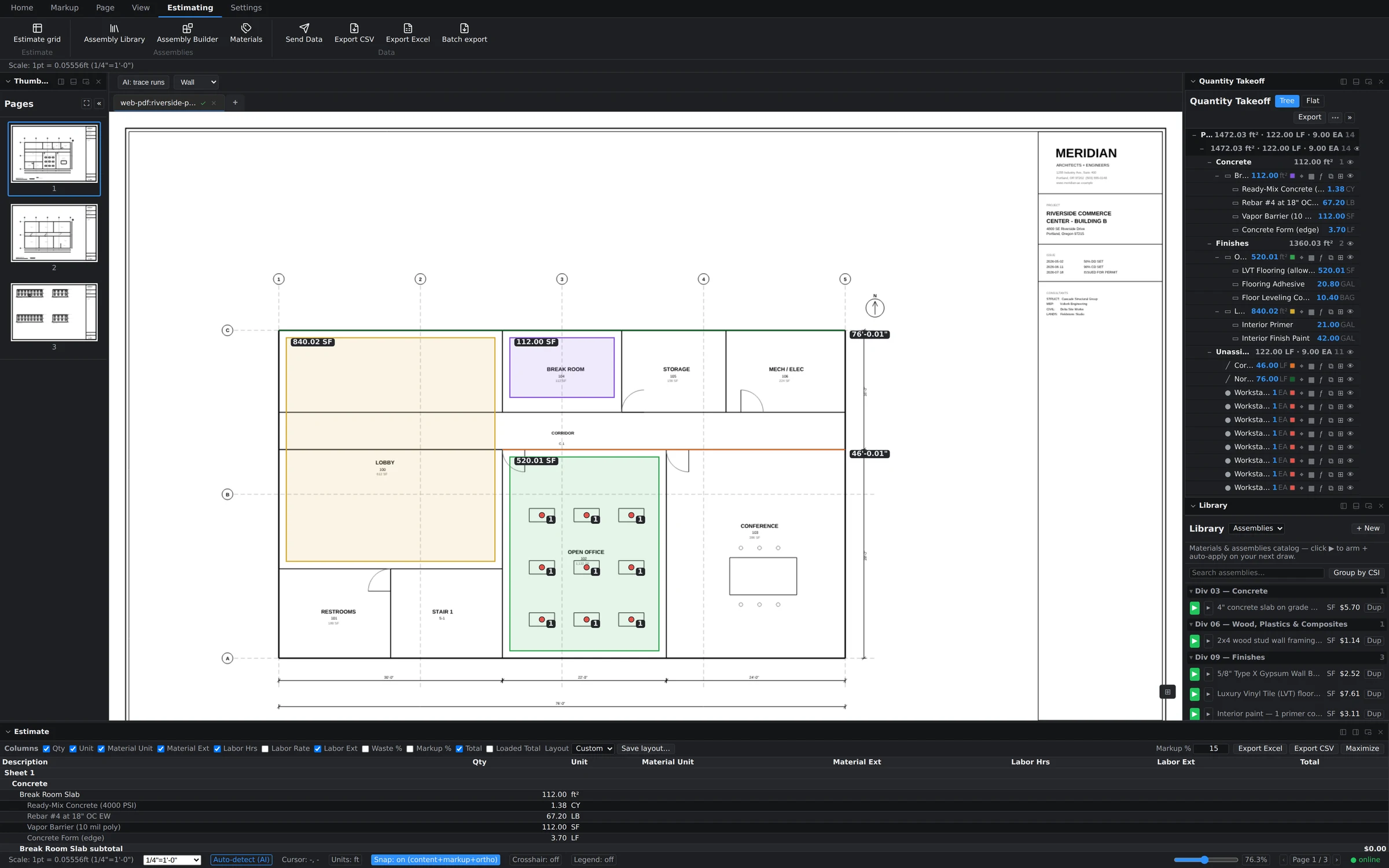
Linear, Segment, Perimeter, Area (rectangle or polygon), Volume and Count — each on its own key. Snap to content, ortho-lock, dimension chains, and a formula evaluator so you can type 12*8+4 anywhere a quantity goes. Wall height turns a linear run into wall area without a second measurement.
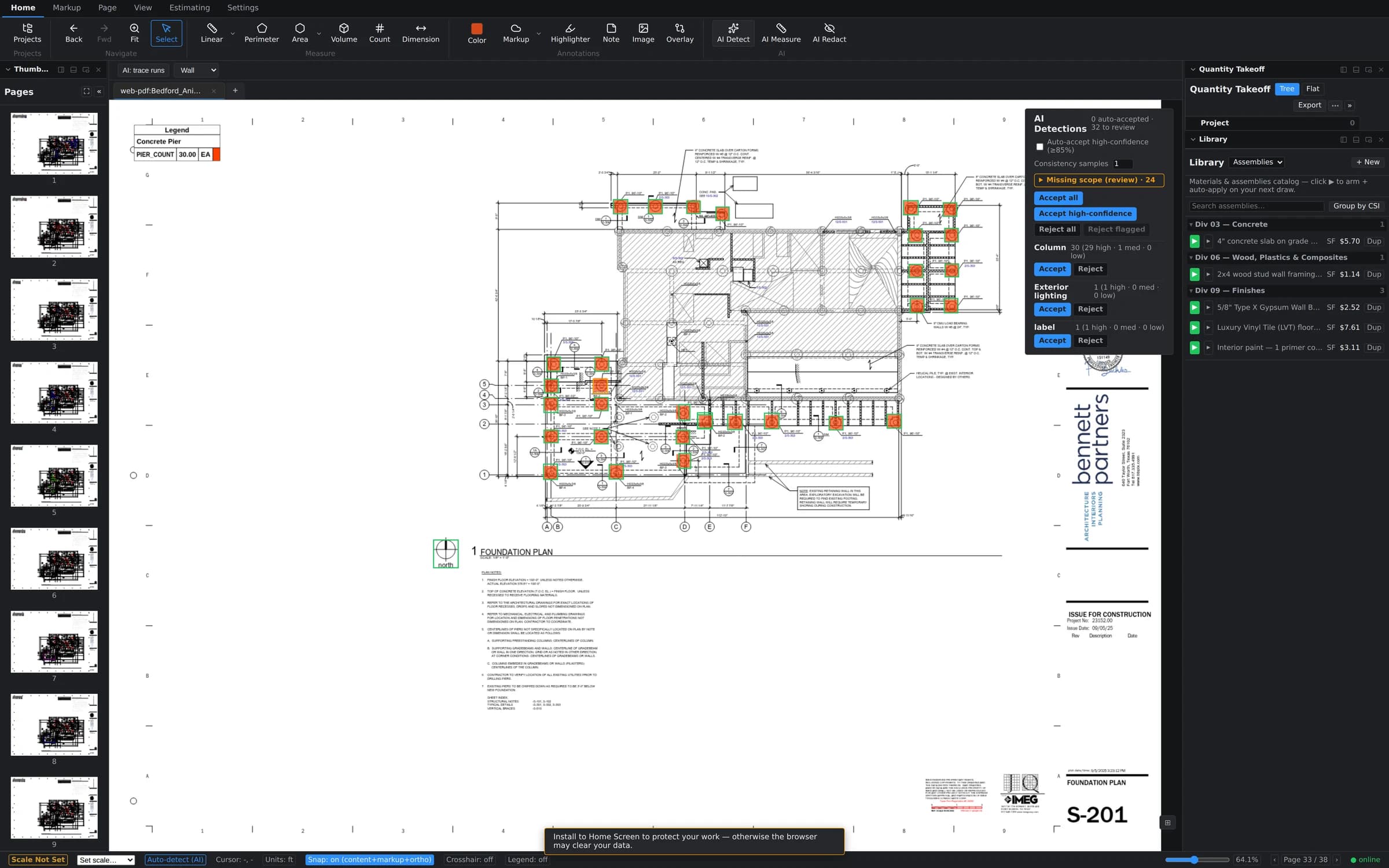
AI does the clicking. You do the judgment.
Scope AI Detect to a region and a trade, and it finds the repeats — fixtures, outlets, doors, whatever the sheet is full of. Every suggestion lands in a review list first. You accept, edit or reject; nothing enters the takeoff until you say so. Included on every seat, including the trial.
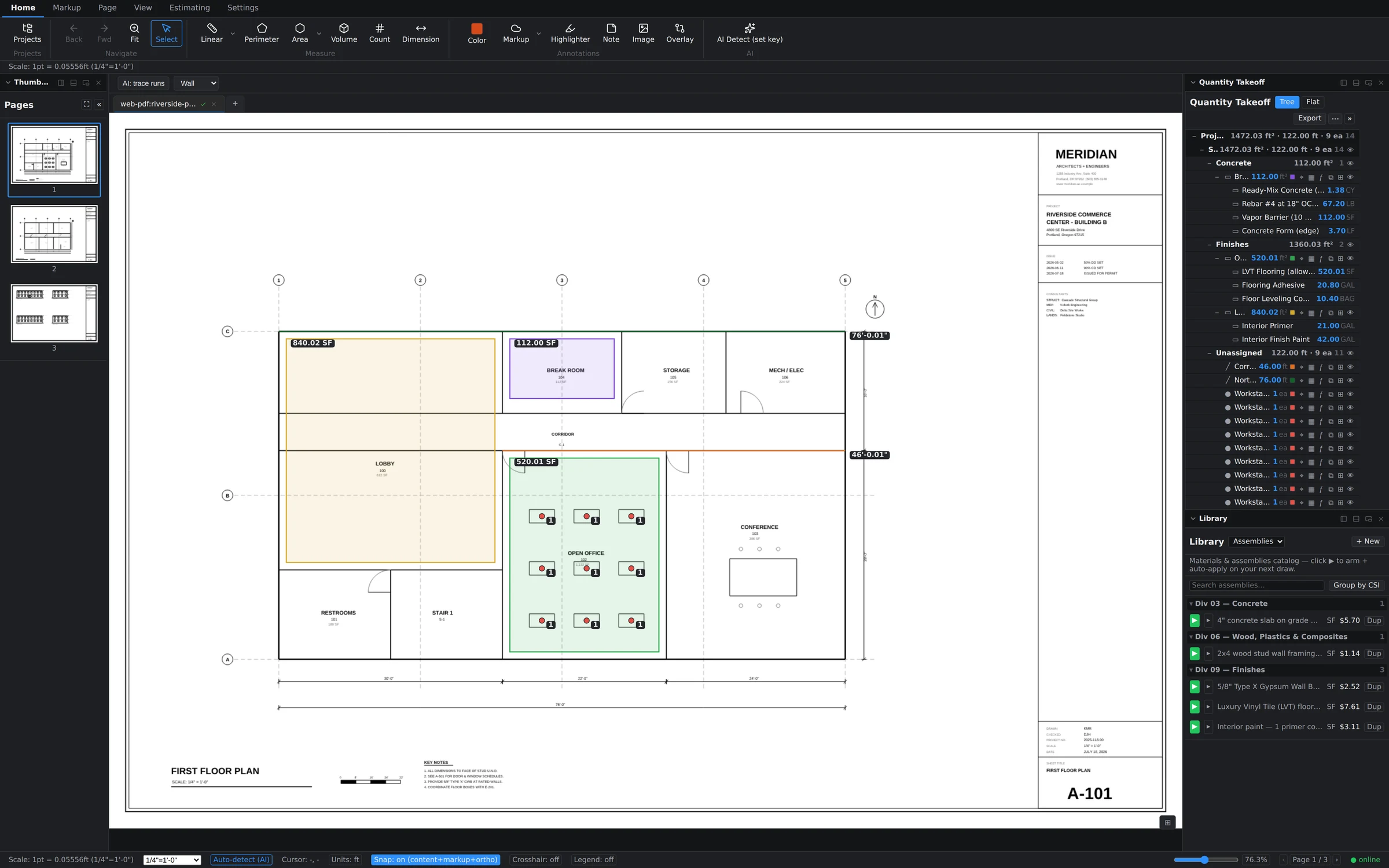
Price it the way you'd check it by hand.
Arm an assembly from your library, then draw. Material, labor, equipment and sub lines build themselves off the measurement as you go. Apply an assembly to a whole folder of takeoffs at once when a scope changes. It is your cost structure, not a vendor's national average.
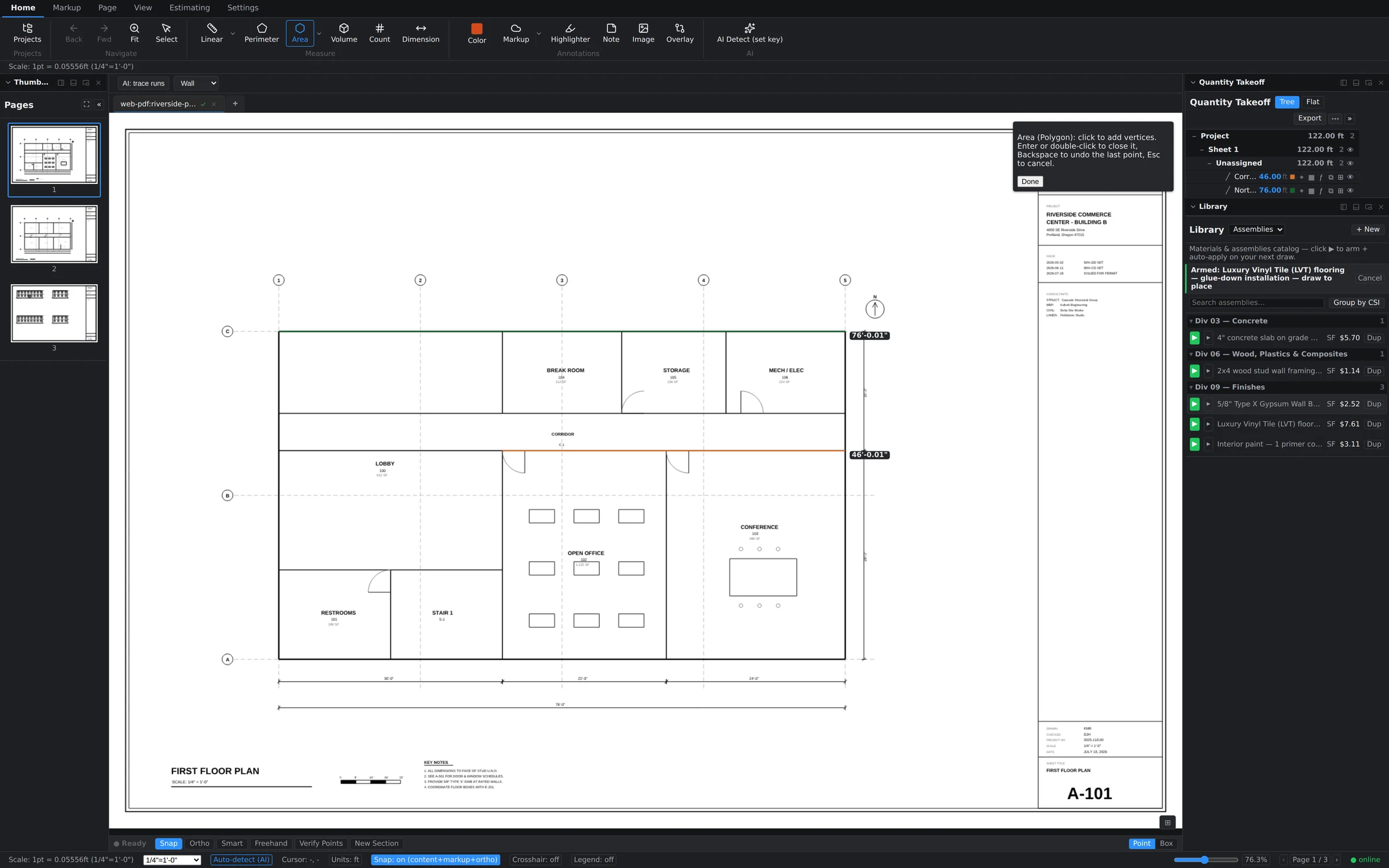
The estimate is the same numbers, in the same window.
The estimate grid is live against the takeoff — change a measurement and the total moves. Mark it up, then send it to Excel, CSV or a marked-up PDF, one sheet or the whole set in a batch. Your GC opens the export without a license, an account, or anything to install.
The industry standard never shipped a Mac app. We shipped two.
Bluebeam discontinued Revu for Mac in 2023 and retired its iPad app on December 31, 2025. Groundwork Takeoff is genuinely native on both desktops — same features, same files, same live session — plus an installable iPad app and a browser build for the machine you're borrowing.
- 01 · Desktop
macOS
Apple silicon and Intel, macOS 12+. A real .dmg, not a browser tab pretending.
Universal build - 02 · Desktop
Windows
Windows 10 and 11, 64-bit. Native rendering through the same pdfium engine.
.msi installer - 03 · Field
iPad
Add to the Home Screen and take the live set to the walk. Apple Pencil markup, touch takeoff.
Installable web app - 04 · Anywhere
Browser
Nothing to install. Sign in on a borrowed machine and keep going from where you were.
Any modern browser
Offline is not an outage. Work saves locally and merges when the signal comes back, and a signed-in seat carries a 14-day offline grace period — so a fortnight in a dead zone doesn't lock you out of your own takeoffs.
How offline sync works →AI does the clicking. You do the judgment.
Nothing an AI suggests enters your takeoff on its own. Detections land in a review list with the region and trade they came from; you accept, correct or throw them out. That is the whole philosophy — the machine is fast at finding repeats and bad at knowing what's in your scope.
- AI Detect for repeated symbols, scoped to a region and a trade
- AI measure suggestions you review before they commit
- AI-assisted redaction for sheets that leave the building
- Built-in OCR — a scanned addendum becomes searchable text
- Works with Claude over MCP — token-gated, off by default, one undo per write
Included on every seat at every price, including the trial. Others gate it by tier:
- Bluebeam RevuAI is the $590 Max tier only
- KreoAI measurement is Pro ($175/user/mo) only
- PlanSwiftAuto Count / Auto Scale from Essential; full auto-takeoff at Core $3,000
STACK and Togal.AI do include AI in the tiers we compare — at $2,988 and $3,588 a seat a year. List pricing from each vendor's own page, September 20, 2026.
Read how detection actually works →The review list. Nothing on the left is in the takeoff yet.
Nobody else in this category will still sell you one.
We read every takeoff vendor's own pricing page on September 20, 2026. Every single one of them is subscription-only. One of them stopped selling perpetual licenses outright; the rest never offered one. If you want to own your estimating software, there is exactly one option left, and this is it.
- Bluebeam
Perpetual sales ended in 2023. Revu 20 goes dark this year.
After September 30, 2023, Bluebeam stopped selling new perpetual licenses and maintenance. Revu 20 left support on July 31, 2026 and reaches end of life on December 31, 2026 — so a Revu 20 perpetual seat loses Studio, updates and support, and the path forward is a subscription.
The comparison & sources → - Everybody else
Subscription only. All of them.
Not one of the others publishes a perpetual option — stop paying and the software stops. Here is what each one's own page says:
- PlanSwiftSubscription only — no perpetual license offered
- STACKSubscription only
- On-Screen TakeoffNot published
- Togal.AISubscription only
- KreoSubscription only
- Drawboard ProjectsSubscription only
- Groundwork
$2,500, once, and it stays yours.
If you stop paying us, the version you own keeps running. Maintenance adds new versions and support; dropping it costs you upgrades, never access. Public pricing, self-serve cancel, no 30-day written-notice trap.
See the perpetual terms →
And read-only is not a lockout. If a subscription lapses, viewing, panning, printing and every export keep working. You can always get your own numbers out — that is written into how the license gate is built, not just into a promise.
Bring your renewal invoice.
7 comparison pages with sourced list pricing and honest feature tables. Where a competitor is genuinely better at something, we say so on their page — it costs us nothing and it is the only way a comparison is worth reading.
| Product | Annual / seat | Perpetual | AI included | Native Mac |
|---|---|---|---|---|
| Groundwork Takeoff | $590 | $2,500 | ||
| Bluebeam Revu | $260–$590 | |||
| PlanSwift | $2,000–$3,000 | |||
| STACK | $2,988–$3,588 | |||
| On-Screen Takeoff | Not published | |||
| Togal.AI | $3,588 | |||
| Kreo | $420–$2,100 | |||
| Drawboard Projects | $270–$370 |
On-Screen Takeoff and Drawboard Projects are left out of the savings arithmetic entirely rather than estimated into it — they publish no comparable price.
- Groundwork vs
Bluebeam Revu
The standard — if you are on Windows and nobody is checking the per-seat creep. Revu 20's end of life is the whole story.
Read the comparison - Groundwork vs
PlanSwift
Thousands a seat a year, Windows only, subscription only. Genuinely deep assembly logic; genuinely expensive.
Read the comparison - Groundwork vs
STACK
Cloud takeoff with AI included, priced like a platform. Strong for teams that live in a browser and never lose signal.
Read the comparison - Groundwork vs
On-Screen Takeoff
A genuinely capable classic, still quote-only and still Windows-only. Ask them for a number and see what happens.
Read the comparison - Groundwork vs
Togal.AI
AI takeoff without the AI-startup price tag — and ours works with no signal.
Read the comparison - Groundwork vs
Kreo
Cheap to start, but the AI measurement everyone comes for is the top tier.
Read the comparison - Groundwork vs
Drawboard Projects
Cheaper than us, and honestly a different product: markup and collaboration, not takeoff and estimating.
Read the comparison - All 7
The comparison hub
Every competitor in one table, with the sources under it.
Open the hub
List pricing read from each vendor's own published page on September 20, 2026. Competitor names and pricing are the property of their respective owners and are subject to change.
- Bluebeam Revu: bluebeam.com/pricing
- PlanSwift: planswift.com/pricing
- STACK: stackct.com/takeoff-and-estimate-pricing
- On-Screen Takeoff: Buyers are directed to contact ConstructConnect for pricing
- Togal.AI: togal.ai/pricing
- Kreo: kreo.net/pricing
- Drawboard Projects: drawboard.com/pricing
Written documentation, not a contact form.
Every tool, panel and workflow in the product has an article with real screenshots of the real app. Read the whole thing before you buy anything — it is the fastest way to find out whether this fits how you actually estimate.
- Start here
Your first takeoff
Sign in, open a set, set the scale, draw, export. Twenty minutes.
- Accuracy
Setting the scale
Auto-detect, two-point calibration, and what to do on an unscaled sheet.
- Estimating
Assemblies & library
Build your cost structure once and arm it on every job.
- AI
Connect Claude (MCP)
Point an assistant at your own takeoff data, safely.
Win the next bid.
Sign up, open a set, and see whether it measures the way you do. Nothing is charged when the week ends — there is no card on file to charge.
Need the rest of the job, not just the bid?
Groundwork ERP carries the same estimate through scheduling, RFIs, job cost and the pay application. Takeoff is its own product at its own price; you do not need one to use the other.