
Generate an AIA G702/G703 pay application
Before you begin
Your schedule of values needs to be set up on the project (this typically happens once, at project setup, from the approved budget). Any change orders you want reflected in this billing period should already be Executed, not just approved. Executed is what actually updates the contract sum.
Steps
-
Go to Finance → Pay Applications → New Application.
-
Select the billing period. Groundwork pulls prior applications automatically so "previous certificates for payment" is never hand-typed.
-
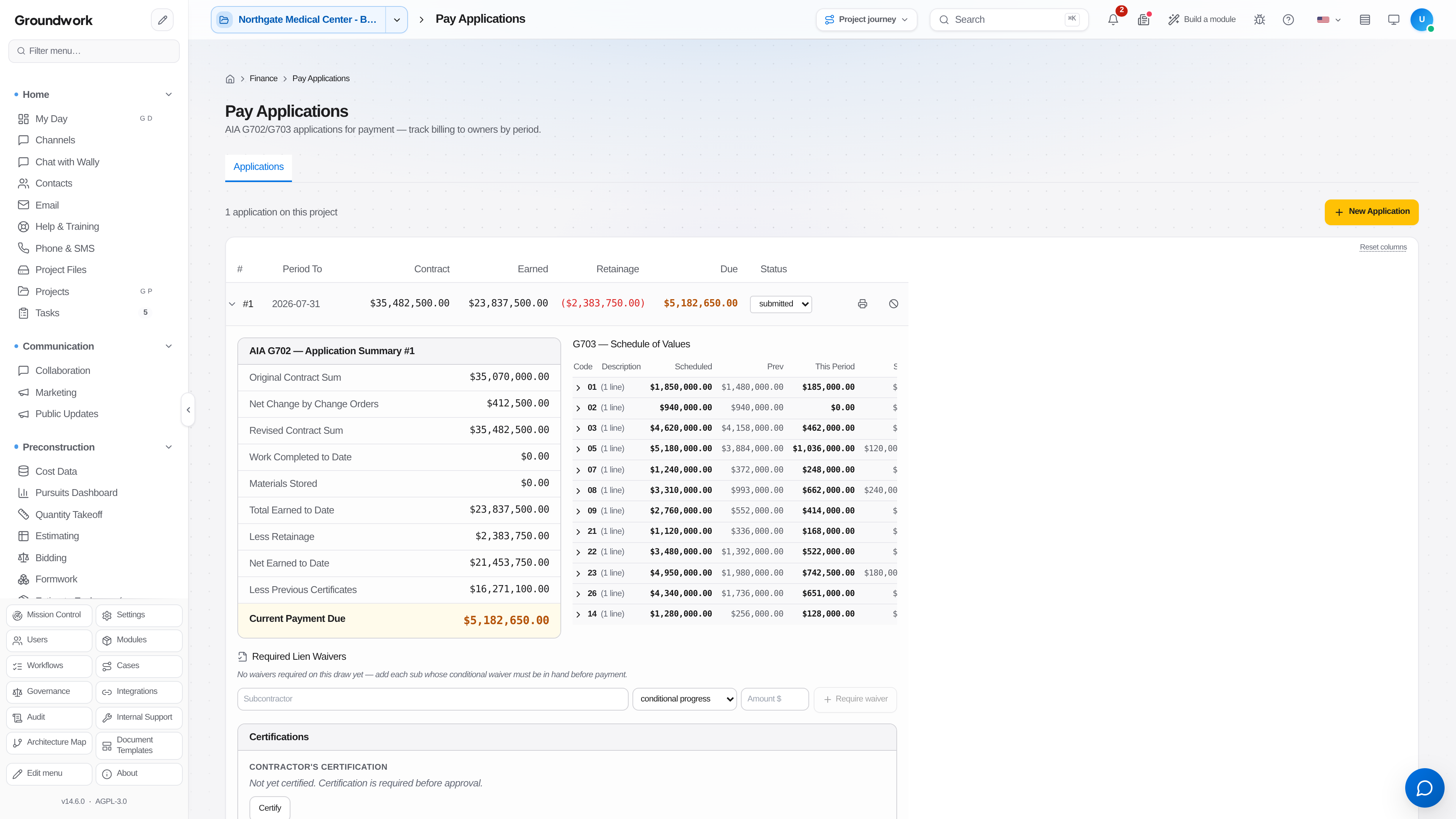
For each schedule-of-values line, enter work completed this period and materials stored, if applicable. Percentage complete and retainage compute automatically per the project's retainage terms.
-
Attach stored-material documentation if billing for materials not yet installed (required by most contracts before an owner will approve that line).
-
Review the generated G702 summary and G703 continuation sheet.
-
Submit for internal approval, then export as a signed PDF to send to the owner or architect.
What happens next
Once submitted, the application shows as Pending Certification until the architect/owner's rep certifies an amount, which isn't always identical to what was requested. Record the certified amount when it comes back so retainage and "previous certificates" stay accurate for the next period.
Where the record lives
Every pay application, at every status, is retained under Finance → Pay Applications, with its G703 line items tied directly to the same cost codes as the job cost report. A question about why a line was billed a certain way traces back to the same underlying data, not a second spreadsheet.
Troubleshooting
Percentage complete looks wrong on a line: this is computed from cumulative billed-to-date over scheduled value, so check whether a prior period's entry was a typo rather than assuming this period's math is broken.
Retainage doesn't match the contract: confirm the project's retainage terms (a flat percentage, or a reduced rate after 50% completion) are set correctly at the project level; a line-by-line manual override is also available for contracts with non-standard terms on specific scopes.
Still stuck?
Send this straight to support (it goes directly to support@groundworkai.io).